Setting up bookkeeping for a small business starts with separating your business and personal finances, choosing an accounting method, selecting bookkeeping software, and organizing your financial transactions. Once your system is in place, you need to record income and expenses, reconcile your accounts, and review financial reports regularly.
You don’t need to be an accountant to set up bookkeeping for a small business. With the right tools and a consistent routine, you can maintain accurate financial records, track cash flow, and make tax preparation much easier.
This guide walks you through how to set up bookkeeping in 10 practical steps, whether you’re starting a new business, working as a freelancer, or moving from spreadsheets to accounting software.
| Step | Why it matters |
| 1. Separate business and personal finances | Keeps financial records organized |
| 2. Choose an accounting method | Determines when income and expenses are recorded |
| 3. Select bookkeeping software | Centralizes and automates financial records |
| 4. Set up a chart of accounts | Organizes transactions into categories |
| 5. Enter opening balances | Establishes accurate starting figures |
| 6. Connect financial accounts | Simplifies transaction tracking |
| 7. Set up invoicing and expense tracking | Records money coming in and going out |
| 8. Organize financial documents | Supports deductions and tax compliance |
| 9. Reconcile bank and credit card accounts | Identifies missing or incorrect transactions |
| 10. Establish a bookkeeping routine | Keeps financial information accurate and current |
Why You Can Trust Founder’s Guide
At Founder’s Guide, our content team brings more than 20 years of combined experience in business, finance, accounting, marketing, and entrepreneurship. We understand the financial challenges small business owners face, from managing everyday expenses to keeping accurate records for tax reporting.
Our bookkeeping guides focus on practical steps, established accounting principles, and reliable resources, including guidance from the Internal Revenue Service (IRS). We aim to help business owners understand their financial responsibilities and choose systems that fit their operations without unnecessary complexity.
Why Is Bookkeeping Important for a Small Business?
Bookkeeping is the process of recording, organizing, and maintaining a business’s financial transactions. It provides the financial information you need to understand how much your business earns, spends, owes, and owns.
The IRS explains that maintaining good records helps businesses monitor performance, prepare financial statements, identify income sources, track expenses, and support tax returns.
A properly maintained bookkeeping system helps you:
- Understand profitability: See whether your revenue is enough to cover operating costs.
- Manage cash flow: Monitor customer payments, bills, and available cash.
- Prepare for taxes: Maintain records that support income, deductions, and credits.
- Make better business decisions: Use financial reports to evaluate expenses, pricing, and growth opportunities.
- Apply for financing: Provide lenders with organized financial statements when required.
For example, a freelance graphic designer earning $6,000 per month might assume the business is performing well. However, after recording $2,000 in operating expenses, $1,000 in contractor costs, and $500 in software and advertising expenses, the designer discovers that only $2,500 remains before taxes and other adjustments.
Without bookkeeping, it’s easy to confuse revenue with profit.
How to Set Up Bookkeeping in 10 Steps
Step 1: Separate Your Business and Personal Finances
The first step is to establish a clear separation between your business and personal financial transactions.
Open a dedicated business checking account and consider obtaining a business credit card. Use these accounts exclusively for business-related income and expenses.
According to IRS Publication 583, opening a separate business checking account is one of the first things business owners should do when establishing their financial records.
Separating your finances makes it easier to track business expenses, reconcile accounts, and identify deductible costs.
Example: If you use your personal credit card to pay for a $150 business software subscription, you’ll need to identify and properly record that transaction in your books. Paying through a dedicated business account makes the transaction easier to track.
Practical tip: If you operate as a sole proprietor, you may not always be legally required to maintain a separate business bank account, depending on your circumstances. However, doing so is a good bookkeeping practice. Corporations and LLCs should also consider their legal and banking requirements for maintaining separation.
Step 2: Choose Between Cash and Accrual Accounting
Before recording transactions, decide which accounting method your business will use.
Your accounting method determines when revenue and expenses appear in your financial records.
| Feature | Cash accounting | Accrual accounting |
| Revenue recognition | When payment is received | When revenue is earned |
| Expense recognition | When payment is made | When expenses are incurred |
| Complexity | Simpler | More complex |
| Best suited for | Many freelancers and small service businesses | Businesses with inventory, credit sales, or more complex operations |
| Main advantage | Easier to monitor cash activity | Provides a fuller picture of financial performance |
Example: Suppose you complete a $2,000 consulting project in October but receive payment in November.
Under cash accounting, you generally recognize the $2,000 as revenue in November, when payment is received.
Under accrual accounting, you recognize the $2,000 in October, when the service is completed and revenue is earned.
For businesses with relatively simple transactions, cash accounting may be easier to maintain. Accrual accounting is often more useful when you need to track accounts receivable, accounts payable, and financial performance across reporting periods.
However, your choice isn’t entirely based on preference. Certain businesses must use accrual accounting for federal tax purposes, and special rules may apply to inventory and other transactions.
Review the IRS guidance on accounting methods or consult a tax professional before choosing or changing your tax accounting method.
Step 3: Choose Bookkeeping Software
Once you’ve selected your accounting method, the next step is to choose how you’ll record and organize your transactions.
You can use a spreadsheet, a manual bookkeeping system, or dedicated accounting software.
Spreadsheets may work for freelancers with only a handful of monthly transactions. However, accounting software becomes more valuable as transaction volume increases or you begin managing invoices, bills, inventory, and payroll.
Popular small business accounting software options include:
 |
QuickBooks Online
A comprehensive option for businesses that need invoicing, expense tracking, bank reconciliation, financial reporting, and integrations. |
 |
Xero
A cloud accounting platform suitable for businesses that want bank feeds, collaboration with accountants, and accounts payable management. |
 |
Zoho Books
A useful choice for small businesses looking for invoicing, automated workflows, and integration with other Zoho applications. |
 |
Wave
A straightforward option for freelancers and very small businesses with basic invoicing and bookkeeping needs. |
When comparing software, consider transaction volume, monthly subscription costs, bank connectivity, reporting features, integrations, and whether you need inventory or project accounting.
Also check whether your accountant or bookkeeper is familiar with the platform.
Practical tip: Choose software based on the features you need today and the ones you’re likely to need as your business grows. Avoid paying for advanced features you won’t use.
Need help choosing the right bookkeeping software? Check out our Best Accounting Software in 2026: Features, Pricing, and Expert Reviews to compare top providers, explore their features and pricing, and find the best fit for your small business.
Step 4: Set Up Your Chart of Accounts
A chart of accounts (COA) is an organized list of categories used to classify financial transactions.
It forms the foundation of your bookkeeping system and determines how transactions appear in financial reports.
Most accounting software provides a default chart of accounts that you can customize.
Your chart of accounts should contain five main account categories.
| Account category | Examples |
| Assets | Cash, accounts receivable, inventory, equipment |
| Liabilities | Credit card balances, loans payable, accounts payable |
| Equity | Owner’s capital, retained earnings, owner distributions |
| Income | Sales revenue, service income |
| Expenses | Rent, utilities, advertising, software subscriptions |
For example, a marketing agency might create separate expense accounts for advertising, software subscriptions, contractor payments, and office expenses.
This allows the owner to see how much the business spends on each activity.
Avoid creating too many accounts. Instead, start with broad categories and add subaccounts only when they provide useful reporting information.
Practical tip: Don’t classify loan proceeds as revenue or owner withdrawals as ordinary business expenses. Both mistakes can distort your profit and loss statement.
Step 5: Enter Your Opening Balances
Opening balances represent the financial position of your business on the date you begin using your bookkeeping system.
If you’re starting a brand-new business with no previous financial activity, this step may be relatively simple.
However, if you’re moving from spreadsheets or another accounting system, you’ll need to bring over your existing balances.
These may include:
- Business checking and savings account balances
- Outstanding customer invoices
- Unpaid vendor bills
- Credit card balances and outstanding loans
- Inventory and fixed assets
- Owner’s equity or retained earnings
For example, suppose you’re migrating to accounting software on January 1, and your business has $8,000 in the bank, $3,000 in unpaid customer invoices, and $2,000 in credit card debt.
Your opening balances should reflect these amounts, along with any other assets, liabilities, and equity balances.
Use the prior system’s closing trial balance or a verified opening balance sheet to establish your starting figures.
Practical tip: Don’t force your opening balances to match by posting unexplained amounts to an opening balance equity account. Investigate discrepancies first. If you’re migrating from another accounting platform, have a bookkeeper or accountant review the balances before proceeding.
Step 6: Connect Your Bank and Credit Card Accounts
Most modern accounting software allows you to connect your business bank accounts and credit cards through automated bank feeds.
Once connected, transactions are imported into the software, reducing the need for manual data entry.
For example, when you pay a $100 internet bill using your business debit card, the transaction may automatically appear in your accounting software for review and categorization.
To set up bank feeds, select your financial institution in the software, follow the secure connection process, and choose the accounts you want to link.
After connecting, review the imported transactions carefully.
Automated bank feeds can save time, but they don’t guarantee that transactions are categorized correctly.
Be especially careful with transfers between accounts, loan payments, refunds, and credit card payments. Recording these incorrectly can create duplicate income or expenses.
Practical tip: Check the date range of imported transactions to avoid duplicating entries already included in your opening balances or previous bookkeeping records.
Step 7: Set Up Invoicing, Bills, and Expense Tracking
Your bookkeeping system should have a consistent process for recording money coming into and going out of your business.
For sales, create invoices with customer information, invoice dates, payment terms, and descriptions of products or services. Record payments against the correct invoices to avoid counting revenue twice.
For expenses, enter vendor bills and purchases under the appropriate categories. Keep supporting documents for each transaction.
If you operate a retail or ecommerce business, you’ll also need a process for recording sales taxes, payment processor fees, refunds, and inventory-related costs.
For businesses with employees, establish a payroll process that properly records gross wages, employee withholdings, employer payroll taxes, and payroll liabilities.
Practical tip: If you use payment processors such as Stripe, PayPal, or Square, reconcile gross sales, fees, refunds, and net deposits. A $970 bank deposit from a $1,000 sale with a $30 processing fee generally should not be recorded as only $970 in sales.
Step 8: Organize Receipts and Financial Documents
Every business needs a reliable system for storing receipts, invoices, bank statements, payroll records, and other supporting documents.
The IRS recordkeeping guidance explains that these documents support the information recorded in your books and reported on tax returns.
You can organize records using cloud storage, accounting software attachments, or a structured digital filing system.
A simple folder structure might look like this:
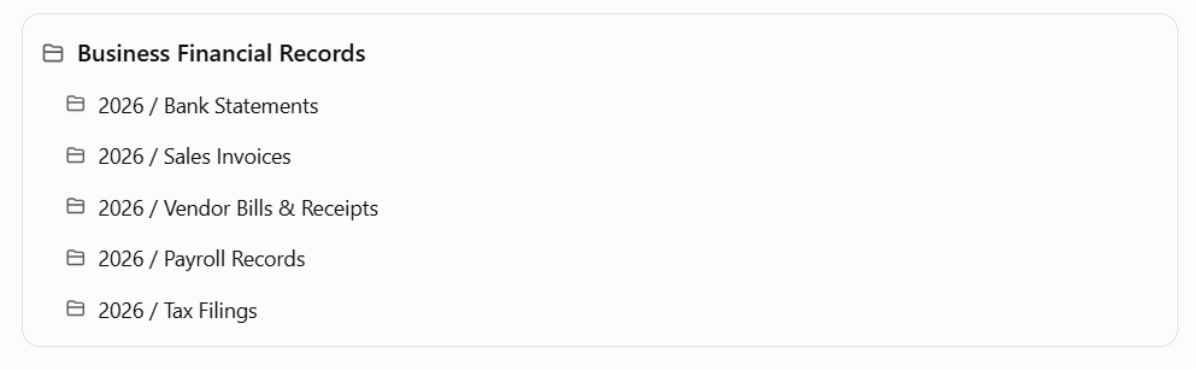
As a general rule, many federal tax records must be kept for at least three years, but certain circumstances require longer retention. Employment tax records generally must be retained for at least four years, and property-related records may need to be retained until after the property is disposed of.
For specific requirements, refer to the IRS record retention guidelines.
Practical tip: Store documents securely and maintain backups. Use consistent file names such as 2026-10-15_OfficeSupplies_125.pdf so receipts are easy to locate.
Step 9: Reconcile Your Bank and Credit Card Accounts
Bank reconciliation is the process of comparing transactions recorded in your bookkeeping system with the transactions shown on your bank or credit card statements.
Its purpose is to identify missing transactions, duplicate entries, incorrect amounts, and other discrepancies.
For example, suppose your bookkeeping software shows a bank balance of $5,250, but your bank statement shows $5,200.
Upon reviewing the transactions, you discover a $50 bank service fee that hasn’t been recorded.
After entering the fee, your adjusted book balance matches the bank statement, assuming there are no other outstanding reconciling items.
To reconcile your accounts, compare the statement’s beginning and ending balances with your records, match transactions, investigate differences, and complete the reconciliation once all discrepancies are resolved.
Xero’s bank reconciliation guide also recommends checking transactions frequently to identify errors sooner.
Practical tip: Reconcile every bank and credit card account at least monthly. Businesses with high transaction volumes may benefit from more frequent reviews.
Step 10: Establish a Regular Bookkeeping Routine
Setting up your system is only the beginning. Accurate bookkeeping requires consistent maintenance.
You don’t necessarily need to spend hours reviewing your books every day, but you should establish a routine that fits your business activity.
For a small service business, this might mean checking transactions weekly and completing reconciliations and financial reports at the end of each month.
Businesses with inventory, employees, or significant daily sales may need more frequent bookkeeping.
A consistent routine also makes it easier to identify unusual expenses, follow up on overdue invoices, and avoid a backlog of uncategorized transactions.
Small Business Bookkeeping Checklist: Daily, Weekly, Monthly, and Annual Tasks
Use this checklist to establish a repeatable bookkeeping process. The frequency of individual tasks will depend on your business size and transaction volume.
Daily or weekly
[ ] Review and categorize bank transactions
[ ] Record sales, customer payments, and expenses
[ ] Save receipts and supporting documents
[ ] Follow up on overdue customer invoices
Monthly
[ ] Reconcile all bank and credit card accounts
[ ] Review unpaid customer invoices and vendor bills
[ ] Review and record payroll liabilities, if applicable
[ ] Review the profit and loss statement and balance sheet
[ ] Investigate unusual balances and correct errors
Quarterly
[ ] Review estimated tax payment requirements
[ ] Prepare and file applicable sales tax returns
[ ] Review cash flow and budget performance
[ ] Meet with a bookkeeper or accountant when needed
Annually
[ ] Complete year-end reconciliations and adjustments
[ ] Review fixed assets and depreciation
[ ] Prepare information for tax returns and applicable 1099 filings
[ ] Close the books and establish opening balances for the new year
What Financial Reports Should You Review?
Once you’ve established your bookkeeping system, the next step is to use the information to understand your business’s financial performance.
Three financial reports are particularly important.
Profit and Loss Statement
A profit and loss statement (P&L), also called an income statement, summarizes revenue, expenses, and net income over a specific period.
For example, if your business earns $15,000 in monthly revenue and incurs $11,000 in expenses, your net profit is $4,000, assuming there are no other income or expense adjustments.
Review your P&L monthly to identify changes in profitability and spending.
Balance Sheet
A balance sheet shows your business’s assets, liabilities, and equity at a specific date.
It follows the accounting equation:
Assets = Liabilities + Equity
For example, if your business has $50,000 in assets and $20,000 in liabilities, its equity is $30,000.
The U.S. Small Business Administration recommends understanding your balance sheet as part of managing business finances.
Cash Flow Statement
A cash flow statement summarizes how cash moves into and out of your business through operating, investing, and financing activities.
Unlike a profit and loss statement, it helps you understand actual cash movement.
For example, a business may report a profit while experiencing cash shortages because customers haven’t paid their invoices.
Reviewing cash flow alongside profitability helps you plan for upcoming bills, payroll, and other financial obligations.
Common Bookkeeping Mistakes to Avoid
Even with accounting software, bookkeeping mistakes can lead to inaccurate financial reports.
| Common mistake | How to avoid it |
| Mixing personal and business expenses | Use dedicated business accounts |
| Categorizing loan proceeds as revenue | Record loan proceeds as liabilities |
| Recording credit card payments as expenses | Record purchases and payments separately |
| Duplicating imported transactions | Match bank feeds to existing entries |
| Ignoring accounts receivable | Review unpaid invoices regularly |
| Failing to reconcile accounts | Reconcile every month |
| Recording net deposits as gross revenue | Separate sales, refunds, and processing fees |
| Skipping month-end reviews | Establish a monthly closing checklist |
One mistake deserves particular attention: assuming that a successful bank feed connection means your books are accurate.
Accounting software can import transactions automatically, but it cannot always determine their correct accounting treatment. You still need to review categorizations and reconcile accounts.
Should You Do Your Own Bookkeeping or Hire a Bookkeeper?
Many small business owners can manage their own bookkeeping, particularly when their businesses have simple transactions and relatively few accounts.
However, as a business grows, bookkeeping can become more time-consuming.
| DIY bookkeeping may be suitable when | Hiring a bookkeeper may be better when |
| You have relatively few monthly transactions | You process hundreds of transactions |
| You operate a simple service business | You manage inventory, payroll, or multiple entities |
| You’re comfortable using accounting software | You regularly struggle with reconciliations |
| Your financial records are straightforward | You have complex revenue or expense transactions |
| You have time for regular bookkeeping | Bookkeeping takes time away from running the business |
A bookkeeper typically handles transaction categorization, reconciliations, accounts receivable, accounts payable, and financial report preparation.
An accountant or CPA may provide additional services, such as tax planning, financial statement analysis, and specialized accounting advice.
You can also adopt a hybrid approach. For example, you might record everyday transactions yourself while hiring a bookkeeper to review reconciliations and complete monthly closing tasks.
Practical tip: If you’re just starting, consider having an experienced bookkeeper review your chart of accounts and opening balances. Correcting setup errors early is usually easier than fixing months of inaccurate records.
Frequently Asked Questions (FAQs)
How much does it cost to set up bookkeeping for a small business?
The cost depends on whether you use spreadsheets, accounting software, or professional bookkeeping services.
A basic spreadsheet system can have little or no additional software cost. Accounting software typically involves a monthly subscription, while professional setup services may involve a one-time fee or hourly charges.
Businesses with inventory, payroll, or historical bookkeeping issues generally require more setup work than freelancers with straightforward transactions.
How long does it take to set up bookkeeping?
A new freelancer or small service business with simple transactions may be able to establish a basic bookkeeping system in a few hours.
Businesses migrating from another accounting platform or importing historical transactions may require several days or longer, depending on the quality of their existing records.
Do I need an EIN to set up bookkeeping?
Not necessarily. Some sole proprietors can establish a bookkeeping system using their existing taxpayer information.
However, an Employer Identification Number (EIN) may be required based on your business structure, employees, and federal tax obligations.
You can review the requirements and apply through the IRS Employer Identification Number page.
Can I switch bookkeeping software later?
Yes. You can migrate to another accounting platform as your business needs change.
However, switching software may require transferring your chart of accounts, customer and vendor information, outstanding invoices, unpaid bills, and account balances.
Before migrating, back up your financial records, reconcile your existing accounts, and establish a clear conversion date.
What is the difference between single-entry and double-entry bookkeeping?
Single-entry bookkeeping records transactions in a relatively simple income-and-expense format. It may be sufficient for basic cash tracking.
Double-entry bookkeeping records the debit and credit effects of each transaction across the relevant accounts. It provides a more complete accounting system and supports balance sheets and other financial statements.
Most full-featured small business accounting software uses double-entry bookkeeping behind the scenes, so you don’t necessarily need to enter debits and credits manually.
Final Thoughts
Learning how to set up bookkeeping for a small business doesn’t have to be complicated. Start by separating your finances, choosing an appropriate accounting method, and selecting a bookkeeping system that fits your business.
From there, focus on organizing your chart of accounts, recording transactions correctly, reconciling your bank accounts, and reviewing financial reports.
The key is consistency. Even a simple bookkeeping system can provide valuable financial insights when it’s maintained regularly.
If you’re unsure about your opening balances, accounting method, or transaction classifications, consider consulting a professional bookkeeper or accountant before small errors become bigger problems.
With the right bookkeeping foundation, you’ll spend less time sorting through financial records and more time making informed decisions about your business.